

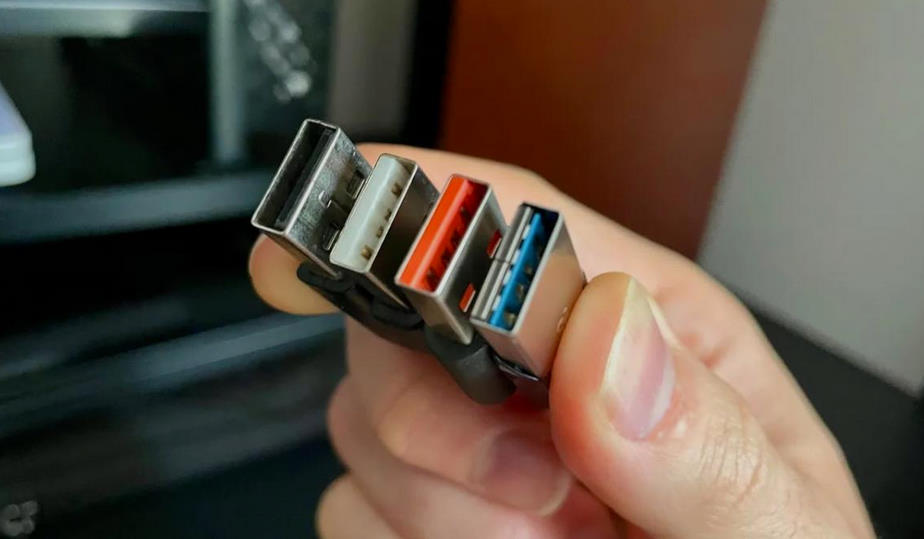
You’ve probably noticed that USB ports come in different colors. But what do they actually mean?
In the past, all USB ports were black, and nobody really paid much attention to it. In reality, though, black USBs were—and still are—one of the most common standards: USB 2.0.
USB 1.0 is long outdated, while USB 2.0 was released in such huge numbers that it still makes up the majority of ports today. Inside each connector, there’s a plastic insert, and it can come in different colors.
With each new generation, not only can data transfer speeds increase, but the amount of power a USB port can deliver can also go up.
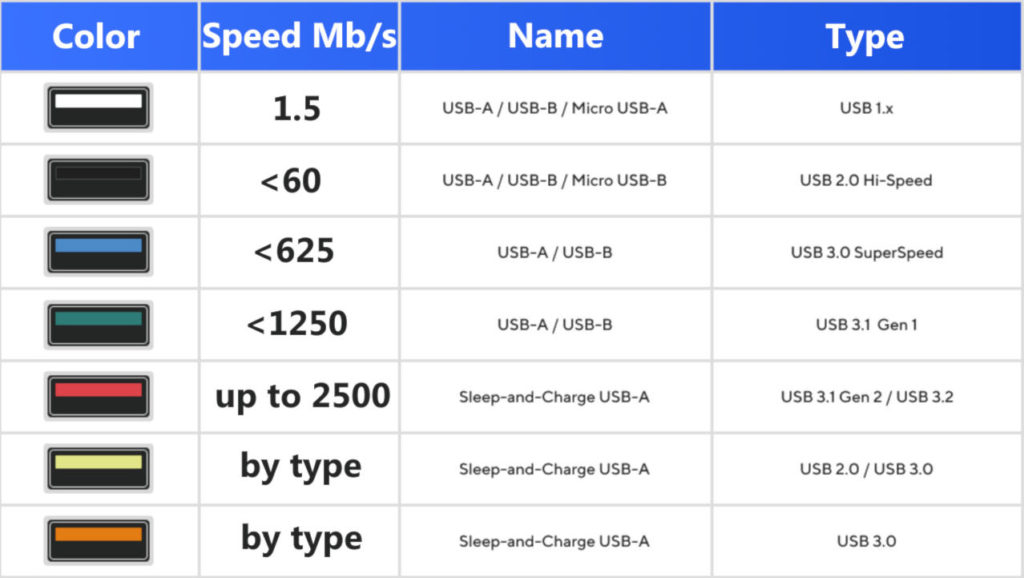
Here’s a quick guide to USB colors:
-
Black – the most stable, reliable option for peripherals, adapters, etc. Works 100% of the time if speed isn’t a priority.
-
Blue – fairly fast, suitable for general use.
-
Greenish-turquoise – a fast port, ideal for copying files.
-
Bright, “hot” colors – fast ports in standby mode.
The latest ports with red, orange, or yellow colors have power control and can charge devices even when your computer is in standby or turned off.
It’s also important to remember that some USB ports are designed specifically for charging and can deliver higher power. For example, USB PD 3.1 EPR can provide up to 240W! But this isn’t determined by color alone.


 English
  Russian